Lightning Component ⇄ Visualforce Page
This post is all about building up a communication link between a Lightning Component and a Visualforce Page. We can send data from a VF page to a Lightning Component and vice versa.
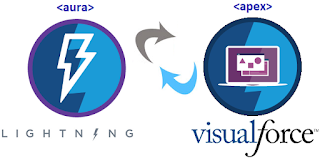
Firstly we are gonna talk about nesting a lightning component inside a VF Page and sending some data to the lightning component. Follow below steps:
1. Import Lightning script
2. Create a Lightning Application with Lightning Out Dependency.
3. Create a Lightning Component and use it in your lightning application created above.
4. Create a VF Page and copy the below code to communicate with a lightning component.
VF Page Code:
<apex:page>
<apex:includeLightning />
<script>
$Lightning.use("c:YourLightningApp",function() {
$Lightning.createComponent("c:YourLightningComponent",
{"param": "I am your parent."},
"lightning",
function(cmp) {
console.log('component created');
});
});
</script>
<body>
<div id="lightning"/>
</body>
</apex:page>
Lightning Component Code:
<aura:component>
<aura:attribute type="String" name="param"/>
<span>I am created from a visualforce page which is my {!v.param}</span>
</aura:component>
Lightning Application Code:
<aura:application access="GLOBAL" extends="ltng:outApp">
<aura:dependency resource="c:YourLightningComponent" />
</aura:application>
Now we will talk about using a VF Page in Lightning Component. First of all we need to understand that what is the need of a VF page when we can do everything in Lightning. Well let me introduce a term "Locker Service" for those who don't know about it. Lightning Experience enforces Locker Service which prevents us to use JS Plugins, which calls some external endpoints to perform some operations like Google Map JS API, for security reasons.
This is the main reason why we need to use a VF Page to bypass the Locker Service. So we are gonna create a VF Page and put an iFrame in our Lightning Component which will show our VF Page Content. We have already covered the part where we pass data from a VF page to a Lightning component but now the question arises, how to pass data from Lightning Component to a VF Page.
The answer is to this question is that we can pass data from Lightning Component to a VF page using "postMessage" method in JS. Now you must be very eager to jump to the code. Follow these steps:
1. Create a Lightning Component in which you will put an iFrame.
2. Create a VF Page and update the iFrame source with the URL of this VF Page.
3. Send your parameters in JSON format from the Lightning JS Controller using postMessage method.
4. Add an event listener in your VF Page to receive the message sent in step-3.
5. Use your parameters in your VF page to create something which will be displayed in the Lightning component using iFrame.
Lightning Component Code:
<aura:component>
<aura:attribute name="lcHost" type="String" />
<aura:attribute name="vfHost" type="String" default="" />
<aura:handler name="init" value="{!this}" action="{!c.doInit}" />
<iframe aura:id="vfFrame" src="{!'/apex/YourVFPage?lcHost='+v.lcHost}" />
</aura:component>
Lightning JS Controller Code:
({
doInit : function(component, event, helper) {
component.set('v.lcHost', window.location.hostname);
window.addEventListener("message", function(event) {
if(event.data.state == 'LOADED'){
component.set('v.vfHost', event.data.vfHost);
var message = {
"param" : "This is your parameter value"
};
var vfWindowFram = component.find("vfFrame");
var vfWindowElement = vfWindowFram.getElement();
var vfWindow = vfWindowElement.contentWindow;
vfWindow.postMessage(JSON.stringify(message), '*');
}
}, false);
}
})
VF Page Code:
<apex:page>
<script>
var lexOrigin = 'https://{!$CurrentPage.parameters.lcHost}';
var data;
function sendToLC(message) {
if(typeof(lexOrigin) != 'undefined'){
parent.postMessage(message, lexOrigin);
}
}
//This event listener will receive the message from lightning component.
window.addEventListener("message", function(event) {
data = JSON.parse(event.data);
console.log('data---'+data);
}, false);
//Send State = LOADED to Lightning which will activate the event listener of Lightning JS Controller to send data to VF Page.
var vfHost = "{!LEFT($CurrentPage.URL,FIND('/',$CurrentPage.URL,9))}";
sendToLC({'state':'LOADED', 'vfHost': vfHost});
</script>
<body>
<!--- Use your data to create something here --->
</body>
</apex:page>
Firstly we are gonna talk about nesting a lightning component inside a VF Page and sending some data to the lightning component. Follow below steps:
1. Import Lightning script
2. Create a Lightning Application with Lightning Out Dependency.
3. Create a Lightning Component and use it in your lightning application created above.
4. Create a VF Page and copy the below code to communicate with a lightning component.
VF Page Code:
<apex:page>
<apex:includeLightning />
<script>
$Lightning.use("c:YourLightningApp",function() {
$Lightning.createComponent("c:YourLightningComponent",
{"param": "I am your parent."},
"lightning",
function(cmp) {
console.log('component created');
});
});
</script>
<body>
<div id="lightning"/>
</body>
</apex:page>
Lightning Component Code:
<aura:component>
<aura:attribute type="String" name="param"/>
<span>I am created from a visualforce page which is my {!v.param}</span>
</aura:component>
Lightning Application Code:
<aura:application access="GLOBAL" extends="ltng:outApp">
<aura:dependency resource="c:YourLightningComponent" />
</aura:application>
Now we will talk about using a VF Page in Lightning Component. First of all we need to understand that what is the need of a VF page when we can do everything in Lightning. Well let me introduce a term "Locker Service" for those who don't know about it. Lightning Experience enforces Locker Service which prevents us to use JS Plugins, which calls some external endpoints to perform some operations like Google Map JS API, for security reasons.
This is the main reason why we need to use a VF Page to bypass the Locker Service. So we are gonna create a VF Page and put an iFrame in our Lightning Component which will show our VF Page Content. We have already covered the part where we pass data from a VF page to a Lightning component but now the question arises, how to pass data from Lightning Component to a VF Page.
The answer is to this question is that we can pass data from Lightning Component to a VF page using "postMessage" method in JS. Now you must be very eager to jump to the code. Follow these steps:
1. Create a Lightning Component in which you will put an iFrame.
2. Create a VF Page and update the iFrame source with the URL of this VF Page.
3. Send your parameters in JSON format from the Lightning JS Controller using postMessage method.
4. Add an event listener in your VF Page to receive the message sent in step-3.
5. Use your parameters in your VF page to create something which will be displayed in the Lightning component using iFrame.
Lightning Component Code:
<aura:component>
<aura:attribute name="lcHost" type="String" />
<aura:attribute name="vfHost" type="String" default="" />
<aura:handler name="init" value="{!this}" action="{!c.doInit}" />
<iframe aura:id="vfFrame" src="{!'/apex/YourVFPage?lcHost='+v.lcHost}" />
</aura:component>
Lightning JS Controller Code:
({
doInit : function(component, event, helper) {
component.set('v.lcHost', window.location.hostname);
window.addEventListener("message", function(event) {
if(event.data.state == 'LOADED'){
component.set('v.vfHost', event.data.vfHost);
var message = {
"param" : "This is your parameter value"
};
var vfWindowFram = component.find("vfFrame");
var vfWindowElement = vfWindowFram.getElement();
var vfWindow = vfWindowElement.contentWindow;
vfWindow.postMessage(JSON.stringify(message), '*');
}
}, false);
}
})
VF Page Code:
<apex:page>
<script>
var lexOrigin = 'https://{!$CurrentPage.parameters.lcHost}';
var data;
function sendToLC(message) {
if(typeof(lexOrigin) != 'undefined'){
parent.postMessage(message, lexOrigin);
}
}
//This event listener will receive the message from lightning component.
window.addEventListener("message", function(event) {
data = JSON.parse(event.data);
console.log('data---'+data);
}, false);
//Send State = LOADED to Lightning which will activate the event listener of Lightning JS Controller to send data to VF Page.
var vfHost = "{!LEFT($CurrentPage.URL,FIND('/',$CurrentPage.URL,9))}";
sendToLC({'state':'LOADED', 'vfHost': vfHost});
</script>
<body>
<!--- Use your data to create something here --->
</body>
</apex:page>
First published on Blogger in 2018. Some screenshots and APIs have changed since; the code is kept as written.