Introduction to Web Services
What is the need of Web Services ?
The answer is Web Services are vastly used to integrate with another application. In simple words web services allow us to communicate with the application we are integrating with. For e.g.: A web application is already made through which we can find the currency conversion of any country. I want to use this application through salesforce. To achieve this I will use the web service provided by the Currency Converter application to integrate it into Salesforce. In salesforce terms this is known as Apex callouts (invoking the web services).
Steps to make an Apex Callout:
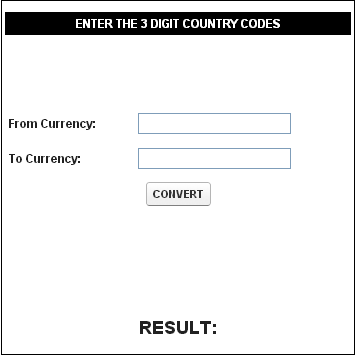
This is how you can make your page look like. There are two input textboxes, a button and an output text field on which Result will be displayed.
Now create the controller for this page. Below is the code for VF page, controller and Apex generated from wsdl:
Page:
<apex:page controller="InvokeCurrencyConvertor" sidebar="false" showheader="false">
<apex:form id="formid">
<table width="50%" align="center" style="min-width:350px" cellpadding="4">
<tr bgcolor="black">
<td colspan="2" align="center"><font color="white"><b>ENTER THE 3 DIGIT COUNTRY CODES</b></font></td>
</tr>
<tr>
<td colspan="2" align="center"><br/><br/><br/><br/></td>
</tr>
<tr>
<td><b>From Currency: </b></td>
<td><apex:inputText value="{!fromcurrency}"/></td>
</tr>
<tr>
<td><b>To Currency: </b></td>
<td><apex:inputText value="{!tocurrency}"/></td>
</tr>
<tr>
<td colspan="2" align="center"><apex:commandButton value=" CONVERT " action="{!convertmethod}" reRender="formid"/></td>
</tr>
<tr>
<td colspan="2" align="center"><br/><br/><br/><br/><br/><br/></td>
</tr>
<tr>
<td colspan="2" align="center"><font size="4"><b>RESULT: </b></font><apex:outputtext value="{!resultcurr}"/></td>
</tr>
</table>
</apex:form>
</apex:page>
Controller:
public class InvokeCurrencyConvertor
{
public String tocurrency { get; set; }
public String fromcurrency { get; set; }
public Double resultcurr{ get; set; }
public void convertmethod()
{
tocurrency = tocurrency.toUpperCase();
fromcurrency = fromcurrency.toUpperCase();
CurrencyConvertor.CurrencyConvertorSoap obj = new CurrencyConvertor.CurrencyConvertorSoap();
try
{
resultcurr = obj.ConversionRate(fromcurrency,tocurrency);
}
Catch(Exception e)
{
ApexPages.AddMessage(new ApexPages.Message(ApexPages.Severity.ERROR,'WRONG INPUT'));
}
}
}
Apex Class generated from WSDL:
public class CurrencyConvertor
{
public class CurrencyConvertorSoap
{
public String endpoint_x = 'http://www.webservicex.net/CurrencyConvertor.asmx';
public Map<String,String> inputHttpHeaders_x;
public Map<String,String> outputHttpHeaders_x;
public String clientCertName_x;
public String clientCert_x;
public String clientCertPasswd_x;
public Integer timeout_x;
private String[] ns_map_type_info = new String[]{'http://www.webserviceX.NET/', 'CurrencyConvertor'};
public Double ConversionRate(String FromCurrency,String ToCurrency)
{
CurrencyConvertor.ConversionRate_element request_x = new CurrencyConvertor.ConversionRate_element();
CurrencyConvertor.ConversionRateResponse_element response_x;
request_x.FromCurrency = FromCurrency;
request_x.ToCurrency = ToCurrency;
Map<String, CurrencyConvertor.ConversionRateResponse_element> response_map_x = new
Map<String, CurrencyConvertor.ConversionRateResponse_element>();
response_map_x.put('response_x', response_x);
WebServiceCallout.invoke(
this,
request_x,
response_map_x,
new String[]{endpoint_x,
'http://www.webserviceX.NET/ConversionRate',
'http://www.webserviceX.NET/',
'ConversionRate',
'http://www.webserviceX.NET/',
'ConversionRateResponse',
'CurrencyConvertor.ConversionRateResponse_element'}
);
response_x = response_map_x.get('response_x');
return response_x.ConversionRateResult;
}
}
public class ConversionRate_element
{
public String FromCurrency;
public String ToCurrency;
private String[] FromCurrency_type_info = new String[]{'FromCurrency','http://www.webserviceX.NET/',null,'1','1','false'};
private String[] ToCurrency_type_info = new String[]{'ToCurrency','http://www.webserviceX.NET/',null,'1','1','false'};
private String[] apex_schema_type_info = new String[]{'http://www.webserviceX.NET/','true','false'};
private String[] field_order_type_info = new String[]{'FromCurrency','ToCurrency'};
}
public class ConversionRateResponse_element
{
public Double ConversionRateResult;
private String[] ConversionRateResult_type_info = new String[]{'ConversionRateResult','http://www.webserviceX.NET/',null,'1','1','false'};
private String[] apex_schema_type_info = new String[]{'http://www.webserviceX.NET/','true','false'};
private String[] field_order_type_info = new String[]{'ConversionRateResult'};
}
}
Note that an instance has been created of the class in which web service invoking method exists. If you read the Apex class which was generated from wsdl you can easily understand the significance of the above code.
The answer is Web Services are vastly used to integrate with another application. In simple words web services allow us to communicate with the application we are integrating with. For e.g.: A web application is already made through which we can find the currency conversion of any country. I want to use this application through salesforce. To achieve this I will use the web service provided by the Currency Converter application to integrate it into Salesforce. In salesforce terms this is known as Apex callouts (invoking the web services).
Steps to make an Apex Callout:
- Web Service of an application is saved as a WSDL file. Download any wsdl you want.
- Salesforce has provided a feature to generate an Apex class from that wsdl. Go to Setup -> Develop -> Apex Classes. Click on Generate from WSDL.
- Before uploading the wsdl file, we need to edit it sometimes. Check if multiple PortType, multiple Bindings are there. If yes then remove multiple instances of both. Otherwise you will not be able to parse the wsdl. NOTE: Download the wsdl from Internet Explorer only (Don't know the reason behind it but it matters).
- Upload the wsdl. Enter the Apex Class name you want to create. Your Apex Class is now generated successfully.
- Create a VF Page and a controller for that on which user can enter the required fields to invoke the web service. In Currency Converter application we need only two input textboxes.
- Now in the controller instantiate the Apex Class generated from wsdl and check which method is invoking the web services. Then call that method using the instance created earlier in this step.
- The method you are going to call might need some parameters and might return some value. So take care of these things.
- The values entered on the VF Page by the user should be accordingly passed as the parameters in the method.
- Create a variable of the data type same as the return type of the method you are calling, so that the result can be stored in that variable.
- Click here to download your Currency Converter WSDL. Make sure to open it in Internet Explorer.
- Click on Generate from WSDL button in Salesforce org. Upload this downloaded wsdl.
- You will get an error "Multiple Porttype not allowed" .
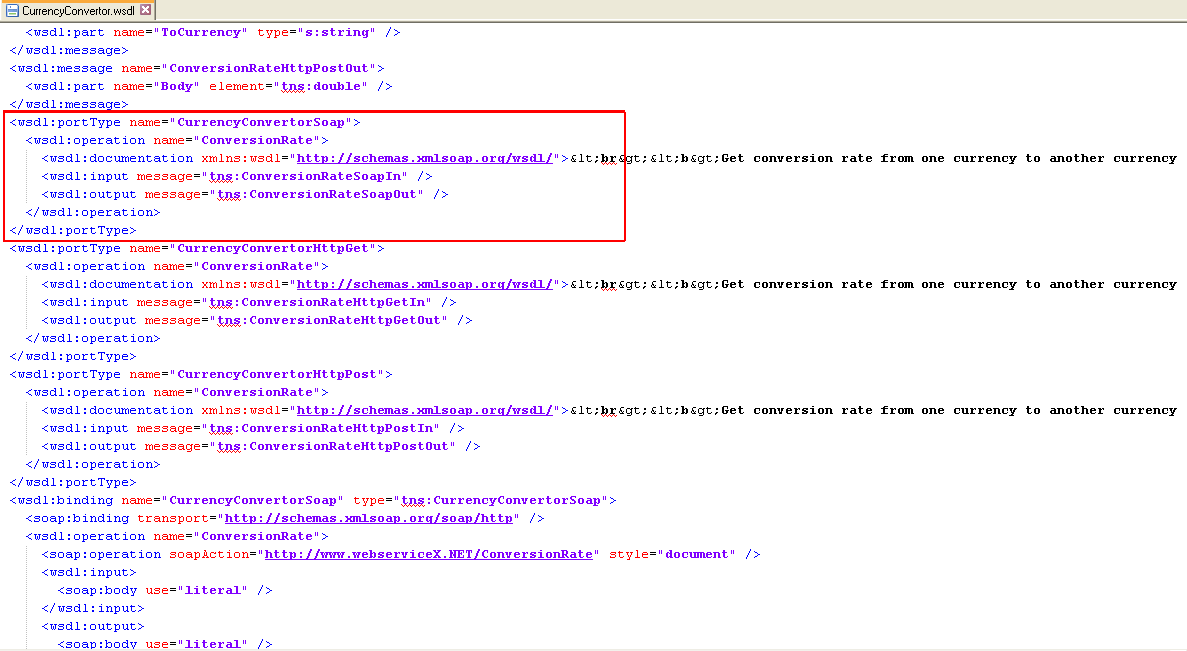
- Now open the downloaded wsdl in Notepad++ or any other editor. Search for Porttype. You can see there are 4 tags for Porttype. We only need the "CurrencyConverterSoap" one. Delete all other three.
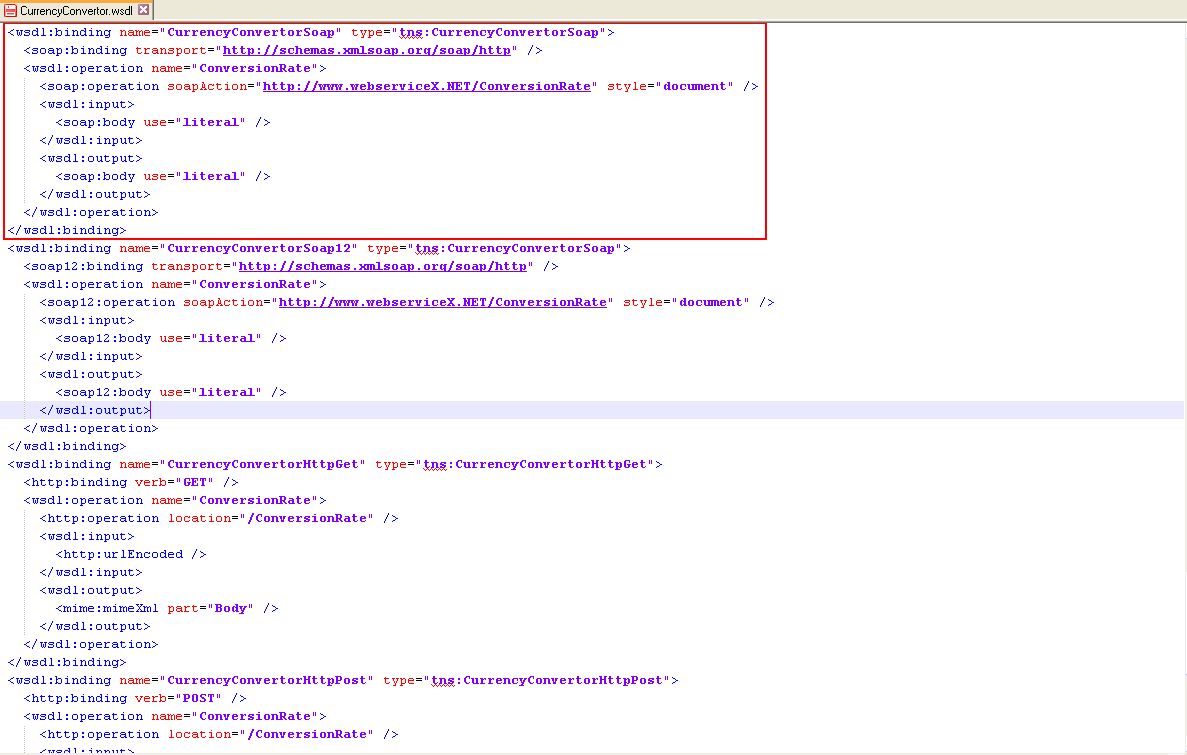
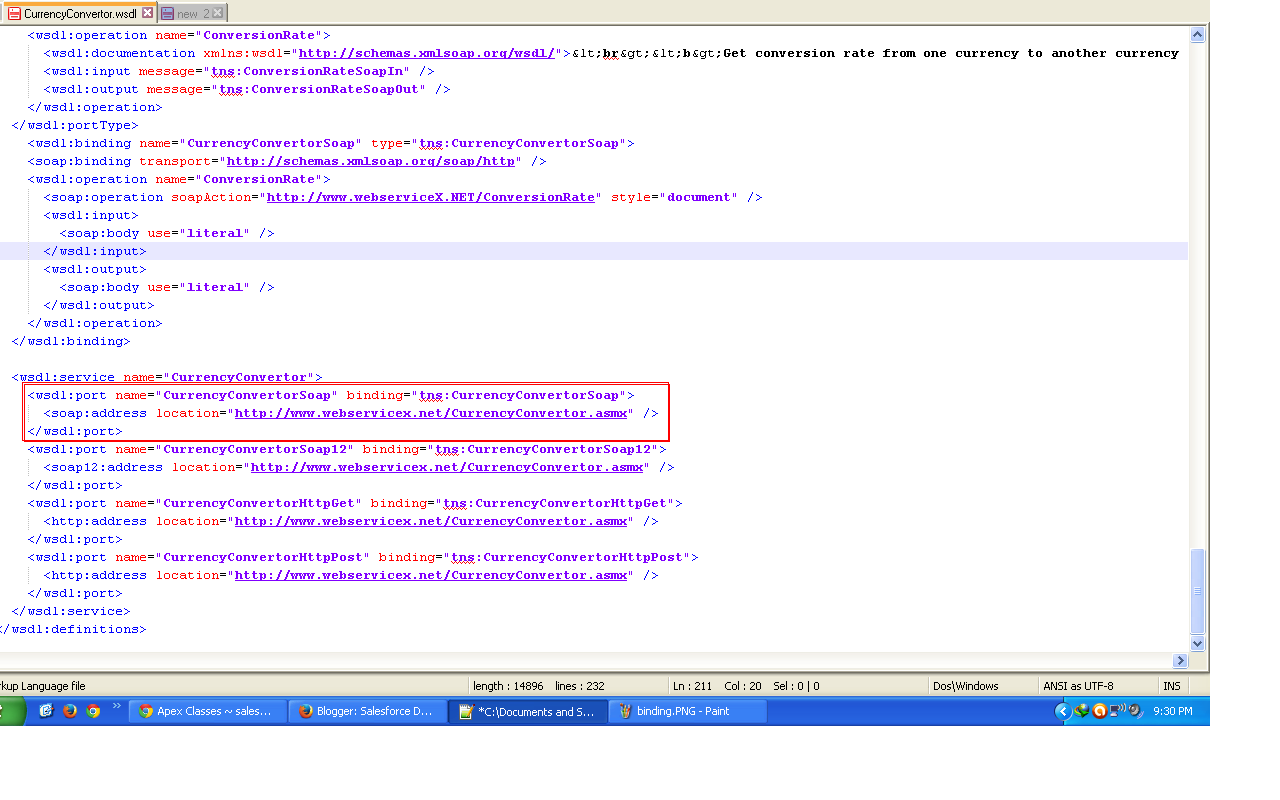
- Now Search for "Binding" and "Port" in the notepad. You have to do same thing now for these two types of tags. Refer the screenshots for editing the wsdl.
Only keep the highlighted section of all three tags: Binding, Porttype and Port. Delete the other Httpget and HttpPost because we are using SOAP services.
- Now click on Generate from wsdl and upload the edited wsdl. Your apex class will be generated with no errors.
- You can check the generated apex from Apex Classes.
This is how you can make your page look like. There are two input textboxes, a button and an output text field on which Result will be displayed.
Now create the controller for this page. Below is the code for VF page, controller and Apex generated from wsdl:
Page:
<apex:page controller="InvokeCurrencyConvertor" sidebar="false" showheader="false">
<apex:form id="formid">
<table width="50%" align="center" style="min-width:350px" cellpadding="4">
<tr bgcolor="black">
<td colspan="2" align="center"><font color="white"><b>ENTER THE 3 DIGIT COUNTRY CODES</b></font></td>
</tr>
<tr>
<td colspan="2" align="center"><br/><br/><br/><br/></td>
</tr>
<tr>
<td><b>From Currency: </b></td>
<td><apex:inputText value="{!fromcurrency}"/></td>
</tr>
<tr>
<td><b>To Currency: </b></td>
<td><apex:inputText value="{!tocurrency}"/></td>
</tr>
<tr>
<td colspan="2" align="center"><apex:commandButton value=" CONVERT " action="{!convertmethod}" reRender="formid"/></td>
</tr>
<tr>
<td colspan="2" align="center"><br/><br/><br/><br/><br/><br/></td>
</tr>
<tr>
<td colspan="2" align="center"><font size="4"><b>RESULT: </b></font><apex:outputtext value="{!resultcurr}"/></td>
</tr>
</table>
</apex:form>
</apex:page>
Controller:
public class InvokeCurrencyConvertor
{
public String tocurrency { get; set; }
public String fromcurrency { get; set; }
public Double resultcurr{ get; set; }
public void convertmethod()
{
tocurrency = tocurrency.toUpperCase();
fromcurrency = fromcurrency.toUpperCase();
CurrencyConvertor.CurrencyConvertorSoap obj = new CurrencyConvertor.CurrencyConvertorSoap();
try
{
resultcurr = obj.ConversionRate(fromcurrency,tocurrency);
}
Catch(Exception e)
{
ApexPages.AddMessage(new ApexPages.Message(ApexPages.Severity.ERROR,'WRONG INPUT'));
}
}
}
Apex Class generated from WSDL:
public class CurrencyConvertor
{
public class CurrencyConvertorSoap
{
public String endpoint_x = 'http://www.webservicex.net/CurrencyConvertor.asmx';
public Map<String,String> inputHttpHeaders_x;
public Map<String,String> outputHttpHeaders_x;
public String clientCertName_x;
public String clientCert_x;
public String clientCertPasswd_x;
public Integer timeout_x;
private String[] ns_map_type_info = new String[]{'http://www.webserviceX.NET/', 'CurrencyConvertor'};
public Double ConversionRate(String FromCurrency,String ToCurrency)
{
CurrencyConvertor.ConversionRate_element request_x = new CurrencyConvertor.ConversionRate_element();
CurrencyConvertor.ConversionRateResponse_element response_x;
request_x.FromCurrency = FromCurrency;
request_x.ToCurrency = ToCurrency;
Map<String, CurrencyConvertor.ConversionRateResponse_element> response_map_x = new
Map<String, CurrencyConvertor.ConversionRateResponse_element>();
response_map_x.put('response_x', response_x);
WebServiceCallout.invoke(
this,
request_x,
response_map_x,
new String[]{endpoint_x,
'http://www.webserviceX.NET/ConversionRate',
'http://www.webserviceX.NET/',
'ConversionRate',
'http://www.webserviceX.NET/',
'ConversionRateResponse',
'CurrencyConvertor.ConversionRateResponse_element'}
);
response_x = response_map_x.get('response_x');
return response_x.ConversionRateResult;
}
}
public class ConversionRate_element
{
public String FromCurrency;
public String ToCurrency;
private String[] FromCurrency_type_info = new String[]{'FromCurrency','http://www.webserviceX.NET/',null,'1','1','false'};
private String[] ToCurrency_type_info = new String[]{'ToCurrency','http://www.webserviceX.NET/',null,'1','1','false'};
private String[] apex_schema_type_info = new String[]{'http://www.webserviceX.NET/','true','false'};
private String[] field_order_type_info = new String[]{'FromCurrency','ToCurrency'};
}
public class ConversionRateResponse_element
{
public Double ConversionRateResult;
private String[] ConversionRateResult_type_info = new String[]{'ConversionRateResult','http://www.webserviceX.NET/',null,'1','1','false'};
private String[] apex_schema_type_info = new String[]{'http://www.webserviceX.NET/','true','false'};
private String[] field_order_type_info = new String[]{'ConversionRateResult'};
}
}
Note that an instance has been created of the class in which web service invoking method exists. If you read the Apex class which was generated from wsdl you can easily understand the significance of the above code.
First published on Blogger in 2013. Some screenshots and APIs have changed since; the code is kept as written.